Friday, July 20, 2007

Color Your iPhone and Your World

Colored_iphone

The iPhone looks great. Everybody agree on that. But it's available in one and only one color. And in a world where "being unique" is almost the ultimate life achievement you can't take the chance to become like everyone else once again. The problem is that the iPhone will rapidly become something everyone has (at least Steve Jobs hope so!).


But don't be scared to become like everybody else in the near future! ColorWare is offering to color your iPhone in 29 different colors. It won't add any new features to the precious gadget and it won't make AT&T Edge network faster, but it will make your iPhone even more cool than it is right now (can it be more cool?).

Having the iPhone in a different color is not enough? Well, add up to four different colors to your iPhone. You can select different colors for the front button, the chrome rim, the back and even the center logo.

The company says, "It's up to you whether you want something out of this world or something subtle and sweet like an all white iPhone."

But a personalized iPhone has a price though. Pricing starts at $149 for the coloring service and the price will go up rapidly depending on the number of colors you would like to have on your iPhone.

Let us know if you plan to use this service, we would love to receive pictures of your newly colored iPhone.

Monday, July 16, 2007

Skype for Pocket PC 2.1 Beta


Great news, a new version of Skype for Pocket PC is now available, which you can download from here or before you do that, why not find out a little more about the cool new features and some great ways to get the most out of Skype on a Pocket PC.

Key features in Skype for Windows Mobile 2.1 beta

Skype calling features: Skype main calling features are supported including free Skype calls, support for SkypeOut™, SkypeIn™, voicemail and call forwarding.
Improved look and feel: As easy and familiar as using Skype on a computer, the new Skype for Pocket PC includes an enhanced SkypeOut dial pad for Pocket PC devices;
One click Skype access: A Skype icon on the device home screen allows you to view and call contacts much more easily;
Multi-person chat: You can now have multi-person chat sessions using animated emoticons with colleagues, friends and family and when you’re offline, chat messages will automatically update the next time you log in;
Enhanced contact list: See your contacts’ avatars and mood messages; and
Profile personalization: Take a picture with the camera on your device and immediately update your profile.

Great reasons to use Skype on a Pocket PC device
You don’t have to be in front of a computer, carry your laptop or wait for it to boot to make Skype calls. Skype for Pocket PC gives you the freedom to make free calls anywhere. All you need is a Pocket PC and a high speed wireless internet connection. Here’s just a few ways that it can make your life easier.

Whilst Abroad: Avoid expensive mobile phone bills while roaming. Check your hotel offers free or low cost WiFi and stay in touch with work, friends and family by connecting to Skype in your hotel or any public WiFi hotspot. Most airports also offer WiFi, so stay connected to your Skype contacts on the go. With SkypeIn, people back home can call you on your Windows Mobile phone paying local rates too.

In your home: Bad reception on your mobile at home? Take advantage of your home broadband connection (make it WiFi) and use Skype for free. Get a SkypeIn number and people who aren’t on Skype can call you on a regular landline number. Alternatively, where your PC is in the study or a different room, Skype for Pocket PC gives you the freedom to talk for free, chat anywhere in your home.

On a train or plane: You can even get WiFi on some trains and planes, so connect to the network and make free Skype calls whether you’re under a tunnel or in the air.

Living in or visiting the USA? Make free calls to landlines and mobiles in the US and Canada whenever you have WiFi access Also, why pay to receive calls on your US mobile? Get a US SkypeIn number here and receive calls for free whenever you have WiFi coverage.

Pocket PC devices that support Skype
Skype runs on most Pocket PC with a minimum 400Mhz processor with a high speed internet connection over WiFi or 3G.

A list of popular device that support Skype can be found here

Feedback
I hope that this was useful and please be sure that the Skype for Windows Mobile team are working hard to make this product even better.

We’re really interested to know what you think about this latest version - what we’re doing well and what we could do better, so do let us know what you think by visiting our Pocket PC Beta area.

Sunday, July 15, 2007

VoIP comes to the iPhone

I want an iPhone, and I’ve got every materialistic reason to demand it. It’s everything iTunes and a fifth generation iPod is, and you can even make and receive calls with it! Add the fact that it’s one of the best multimedia cell phones out there, with looks to die for and connectivity that screams ‘Let’s go,’ and probably you’d want one too. If you do, here’s one more reason for you to have it, and if you don’t, here’s a reason why you might change your mind and end up buying this little new gizmo – VoIP is coming to the iPhone!

Collaboration and Conference provider Genesys has announced that their Genesys Meeting Center 4.0 will be the first VoIP-enabling utility for the iPhone. The Genesys Meeting Center will work via the iPhone’s Safari browser, and will enable all features regularly viewable on a desktop during a web meeting on the iPhone, with complete zooming and portrait/landscape capability. Genesys has announced that the Genesys Meeting Center, which already supports SoftPhone Capabilities, will be compatible with Publisher, Meeting Launcher, Outlook Calendar, and Outlook & Lotus Contacts Control. Complete VoIP on the move – now that’s something.
The iPhone comes with a heavy price tag (US $499 for the 4GB Version, and US $599 for the 8GB one).

That’s one of the reasons why I’m still wishing for an iPhone and don’t actually own one. While the availability of VoIP will not exactly make people discard their previous multimedia smart phones and communicators, it will definitely contribute to the bigger picture of the iPhone hype by adding to its long list of multimedia and communication capabilities.

Is the game worth the candle? I don’t know. Will VoIP be the clinching factor that will make Apple more millions than it’s already making? I don’t know that either. But you know what? I still want an iPhone.

This post is written by Samarth chandola, our full time VOIP news editor.

Saturday, July 14, 2007

NTT DoCoMo Begins Super 3G Experiment

[NTT DoCoMo announces its begn testing its Super 3G system. The highly advanced version of HSDPA and HSUPA technology seeks to achieve a downlink rate of 300Mbps.]
NTT DoCoMo, Inc. announced that this month it began testing an experimental Super 3G system for mobile communications. With this experiment, DoCoMo will seek to achieve a downlink transmission rate of 300Mbps over a high-speed wireless network.

Super 3G features low-latency data transmission and improved spectrum efficiency. It is a highly advanced version of High-Speed Downlink Packet Access (HSDPA) and High-Speed Uplink Packet Access (HSUPA), which have been evolved from W-CDMA packet transmission technologies standardized by the 3rd Generation Partnership Project (3GPP). The 3GPP, a telecommunications standards organization, is currently discussing standardization of Super 3G under the name Long Term Evolution (LTE).

DoCoMo will begin with an indoor experiment to test transmission speed using one transmitting and one receiving antenna. The company will then expand the experiment to examine downlink transmission by employing up to four Multiple-Input Multiple-Output (MIMO) antennas for both the base station (transmission side) and mobile station (receiving side); the goal is to achieve a downlink transmission speed of 300Mbps. MIMO is an antenna technology for wireless communications in which different data streams are spatially multiplexed using multiple antennas for both transmission and reception on the same frequency. Also to be examined is the "handover function" switching of the connection between two base stations.

DoCoMo will also examine the functionality of applications for voice and image transmission, games and the like, key capabilities impacting the Super 3G system's marketability.

DoCoMo, aiming to achieve sustainable, efficient use of 3G spectrum resources, is leading the discussion over LTE. DoCoMo believes Super 3G will allow the company to make a smooth transition to 4G in the future.

In July 2006, DoCoMo began accepting proposals from suppliers seeking to develop Super 3G equipment and expects to complete development of Super 3G technology by 2009.

Nokia announces three new Bluetooth Headsets


Nokia, the global leader in mobility, today announced three new Bluetooth Headsets; the elegant and lightweight Nokia Bluetooth Headset BH-700, the classic feature packed Nokia Bluetooth Headset BH-600 and the sleek Nokia Bluetooth Headset BH-300.

These three new headsets are the latest confirmation of Nokia's innovative approach to Bluetooth headsets. All three Nokia Bluetooth Headsets are planned to be commercially available during the summer of 2006. The estimated retail prices (excluding taxes) for the three headsets are 50-60 EUR for the Nokia Bluetooth Headset BH-300, 60-70 EUR for the Nokia Bluetooth Headset BH-600 and 70-80 EUR for the Nokia Bluetooth Headset BH-700.

Nokia Bluetooth Headset BH-700

Weighing only 10 grams, the Nokia Bluetooth Headset BH-700's simple and elegant form factor offers the ultimate in freedom and comfort when used with a compatible mobile device. With talk time of up to 6 hours and up to 160 hours of stand by time, the Nokia Bluetooth Headset BH-700 provides a hassle-free and long-lasting communications experience. The power button, volume control and call answering buttons make it easy to handle calls.

Nokia Bluetooth Headset BH-600

Nokia Bluetooth Headset BH-600 is a classic, comfortable and easy to use headset that provides excellent audio quality even in noisy environments due to digital signal processing (DSP). The Nokia Bluetooth Headset BH-600 has a talk time of up to 7 hours and up to 170 hours of stand by time and weighs 18 grams.

Nokia Bluetooth Headset BH-300

The sleek minimalist styled Nokia Bluetooth Headset BH-300 is an easy-to-use wireless headset with comfortable user changeable ear loops. Weighing only 10 grams, it completes the Nokia Bluetooth headset trio with very user-friendly functionality and a feeling of simplicity. It has talk time of up to 5 hours 30 minutes and up to 150 hours of stand by time.

Thursday, July 12, 2007

Mundu IM: Mobile Instant Messenger (Win Mobile) 4

Mundu IM all your buddies on MSN, Yahoo, ICQ, AOL, Google Talk and Jabber on your Windows Smartphone from one single user interface. There is no cost per message. Mobile data plan required. You can carry out a host of real-time, important activities such as photo sharing and file transfers, cross-conferencing and dynamic group management. You can also do cool stuff like share photos through the application; express yourself better with Rich Text and status-customization.

Version 4 adds photo sharing & file transfer; E-mail notifications on Yahoo, MSN, and Google; Multi-lingual chat & message archiving.

Download now

Publisher:

Geodesic Information Systems

Tuesday, July 10, 2007

Nokia E65 - The Business Solution


Business solution from Nokia are long known for their user friendliness and a nice bundle of features. Their popularity can be easily gouged by the fact that the business centric E series has sold more number of handsets than any other business phone series. The Nokia E61 is a member of this reputed family of business phone. The qwerty keypad laced smart business phone is aimed at further strengthen their business portfolio.

The Nokia E61 is an ideal device for professional on the go. This silver coloured smartphone is S60 platform based and Symbian OS 9.1 operated. The PDA styled smartphone features a full QWERTY keypad which has a tactile feel to it. This addition is very natural for a device optimized for mobile email. Infact, the Nokia E61 has a unique email indicator so that you could be notified the instant you receive an email. The large 16 million coloured TFT screen is ideal to read mails and documents as well as work on large spread sheets.The handset has a dedicated email key for instant access to your email client. This multi tasking device allows you to send and receive emails while you're still on a call. With the Nokia E61 you can continue reading or writing emails even in absence of network in offline mode. Use the Nokia E61 to read as well as edit attachments sent with your Mobile Phones email. The smartphone supports the most common features of Microsoft Word, PowerPoint and Excel and is compatible with Zip Manager and Adobe Reader.

Connectivity potentials of the O2 Nokia E61 are immense. The handset supports quad band GSM mobile network and includes truly advanced voice services. Data connectivity through GPRS and EDGE of the handset is no match for the 3G technology embedded. In UMTS networks, the Nokia E61 can achieve data speeds of up to 384 kbps. Other connectivity options includes Bluetooth, Infrared, USB and WiFi that could be used for VoIP over WLAN.

From :
- Nokia O2 Mobile Phones.

Saturday, July 7, 2007

VoIP Security: Who Will Be The Next T-Mobile?

Today's hot topic is VoIP security and while there haven't been any huge break-ins into VoIP systems that I am aware of I am aware that according to the WSJ, T-Mobile recently had their computers broken into and customer names and social security numbers were accessed. The bold section below doesn't sound too good but I must admit I slept through much of history class so if there was a day we went over "mutual assistance legal treaties," I was either dreaming or absent.

Nonetheless we seem to have one of these with Russia. Who would have guessed? Here is an excerpt from the story:

Hacker Breaks Into T-Mobile Network

By JESSE DRUCKER and JOHN D. MCKINNON
Staff Reporters of THE WALL STREET JOURNAL
January 13, 2005; Page B5

A hacker broke into the computer systems of T-Mobile USA Inc. over several months, viewing the names and Social Security numbers of 400 customers as well as the files of a Secret Service agent investigating the network break-in, the company and government officials disclosed.

According to the Associated Press, the hacker obtained an internal Secret Service memorandum and part of a mutual assistance legal treaty from Russia. The documents contained "highly sensitive information pertaining to ongoing ... criminal cases," according to court records reviewed by the AP. The hacker also accessed e-mails and computer files.

The break-in was discovered during a broad Secret Service investigation, called "Operation Firewall," that targeted underground hacker organizations.

Nicolas Lee Jacobsen, a 21-year-old computer engineer of Santa Ana, Calif., was charged with the break-in in U.S. District Court in Los Angeles.

Deutsche Telekom AG's T-Mobile, the country's fifth-biggest cellphone-services provider with more than 16 million subscribers, said that its systems were broken into in late 2003. The carrier said it notified the Secret Service, which apprehended Mr. Jacobsen in late 2004. According to the AP, court records said the hacker had access to T-Mobile customer information from at least March through October of last year.

T-Mobile said the customers whose records were viewed were notified in writing, but said that customer credit-card information wasn't accessed.

"This same person is also believed to be involved in other attempts to gain unauthorized access to customer information," a T-Mobile spokesman said in a statement. "The Secret Service is investigating these allegations, and T-Mobile is cooperating to the fullest extent, including with regard to the allegations that customer photos have been subject to unauthorized access."

Will this happen to VoIP at some point? Will conversations be hijacked? Absolutely in my opinion. Somewhere out there, an army of hackers is salivating at the chance to listen in as you call Dominos and order your pepperoni pizza. Once we open up telephony by pushing it over IP packets we need to make sure we are 100% dedicated to ensuring VoIP security. Service providers need to understand how important it is to focus on this issue because who knows what "treaty-talk" could be going on over those packets.

Wednesday, July 4, 2007

fring now supports Windows Mobile 5 and 6

Welcome users of about 300 Windows Mobile handsets and PDAs!

fring for Windows Mobile 5.0 & 6.0 handsets works just like our Symbian for Nokia version with:
• Full fring mVoIP functionality – free calls, chat & presence over any Wi-Fi, 3G or GPRS connection
• fring, Skype, Google Talk, MSN & GSM buddies in one integrated contact list
• twitter support
• Skype-out & hundreds of SIP providers supported
• Turn your SIM–less, Wi-Fi enabled PDA into a mobile phone

Monday, July 2, 2007

Which Mobile VoIP to Choose?


Question: Which mobile VoIP client will end up the winner? Answer: What do you mean by mobile VoIP client? Is it software that lets you make VoIP calls via your cellular data service? That lets you make WiFi calls using your dual mode handset? That lets you initiate cellular calls that end up being delivered over the Internet? Or some or all of the above? You see the problem. At present, mobile VoIP is more a marketing term than a specific service or technology.


The purest form of mobile VoIP travels over IP links all the way to the handset. Usually this requires a 3G-speed cellular data service (and a cellular carrier that doesn't prohibit it). It also requires a soft client that works on the particular handset in question, which at present limits the number of phones you can use. Two obvious examples are Fring and Skype Mobile, Raketu plans to come out this month with a mobile client that will work at less than 3G data speeds. Either way, your choices are limited.

Those clients also support VoIP calls made through wifi hotspots using dual mode cellular/wifi handsets. Other clients for such handsets similarly support VoIP calls over wifi, but not over cellular data networks. In that case, all calls made out of hotspot range have to travel over the cellular voice network. Whether that qualifies as true mobile VoIP is again a matter of definition. Truphone is a high-profile example of this approach.

The possible combinations of software, service models and transport methods are almost limitless. Some services, for example, use clients running on handsets, and VoIP switching, but mainly transport their calls over the PSTN. Others do without the client, but deliver their calls over the Internet. No two contenders take exactly the same approach.

ISkoot is one that uses client software on the handset along with VoIP transport, specifically by delivering mobile calls to Skype. The client reaches out over your cellular data network to set up calls, and connects you to the Skype network via a local call from your phone using your cellular air time. You pay for SkypeOut and SkypeIn services like you would if using them from your PC. For now, iSkoot isn't charging for connecting you to Skype. (It also has a Fring-like dual mode product in beta.)

Mino Wireless also uses client software to set up calls, though you can use your handset's Web browser to go to their site and get the same result. Mino's service initiates calls to your cellphone and to the number you're trying to reach, then connects them in the middle. It uses a combination of conventional telecom carriers and IP infrastructure to carry the calls great distances at low prices.

GrandCentral Mobile, by contrast, is mainly an alternate method of accessing the main GrandCentral service. That service provides the Web-based call management features and flexibility of VoIP, but all calls start and end on the public wire line or wireless networks. The mobile version merely lets you access key features through a handset, and it requires no client software. You simply use your handset's browser to log on to the GrandCentral mobile site. Once there, you can see your voice messages listed, click to listen and call, change your forwarding number, and the like, all through your phone's tiny keypad and LCD screen.

Companies like Jajah, Rebtel, Eqo and others each mix the various ingredients in different ways. So to return to the question of which mobile VoIP will prevail in the future, the answer becomes clear. It will be the one that lets you make cheap mobile calls, with all the flexibility and convenience that VoIP offers, without having to know any of the details you’ve just read.

Source and more info: www.voip-news.com

Skype Mobile VoIP for your Palm TREO by EQO

EQO Communications announced immediate availability of EQO Mobile for Skype on the Palm TREO 650 and Motorola ROKR, SLVR, and RAZR handsets. With this announcement, made at the CTIA Wireless 2006 conference, EQO brings the number of EQO-supported handset models to more than 45 and finally, PalmOS community can put the Skype petition into reset, EQO Communications Mobile Instant Messaging for Skype is now available for download for Palm Treo 650 smartphone users.

Skype Mobile VoIP for your Palm TREO by EQO


"We've built a platform and a solution that is both flexible and adaptable," said Colin Quon, Founder and CTO of EQO. "This enables us to respond quickly to customer demand in expanding support for new and popular phone models as they hit the streets."

EQO uses a small amount of data traffic on your mobile phone so you may wish to consult your wireless service provider about an appropriate data services plan using GPRS. EQO Mobile for Skype lets users make and receive calls, send Instant Messages, and view presence information about their buddies over the Skype network. It is available for free to consumers as a Beta product via the EQO (pronounced "echo") web site at eqo.com

Useful Feedback from users that have already installed it on their Treos:

1. The Mobile App. UI needs lot of improvements. Specially the standard Palm OS Edit functions should be provided (Cut, Copy, Paste).
2. Need to have support for 5-way navigation pad for the two buttons on the bottom of the screen. It is very annoying to press screen and then use the 5-way pad for other functions.
3. The screen keeps flickering on some views. Do not know why.
4. The Call # screen needs much improvement. The first digit you enter appear off the input window.

Skype 3GSM news including Skype Mobile on the HP hw6900


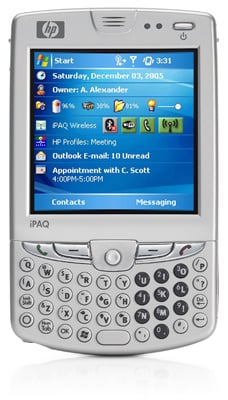
Some Skype news from the first day of 3GSM in Barcelona that a Skype PR representative shared with me. First, HP is announcing that the new HP iPAQ hw6900 supports Skype Mobile for Pocket PC. The hw6900 looks just like the hw6515 that I drooled over, with a 240x240 TFT screen and integrated keyboard. The hw6900 is a bit heavier(6.33 oz vs. 5.8 oz) but it also sports a more powerful 416Mhz processor (the hw6515 has 312Mhz) which will certainly assist the Skype application, which can use all the processing horsepower it can get. The hw6900 also runs the latest Windows Mobile 5.0 operating system.

Secondly, Skype announced a new retail program, with Dangaard Telecom in Europe, giving Skype Certified products the potential to reach shoppers across more than 34,000 European retailers, who will initially include Mediamarkt, Media-Saturn, Merlin, Dansk Supermarked and Surcouf. Lastly, SkypeIn is now available in Korea. Now I'm drooling over the hw6900